Hearth for WordPress · free
Know the day your site is hacked.
One small plugin that watches your WordPress site every day, closes the doors attackers use, and shows you who visits without a cookie banner. It replaces a pile of separate plugins.
For WordPress 5.0 or later, on PHP 7.4 or later
Most WordPress owners find out last
WordPress runs over 40% of the web, so it's what attackers aim at. A hacked site usually looks fine to its owner while it shows casino or pharmacy spam to Google, or quietly redirects phone visitors.
You find out from a customer
Or from Google, when your listing suddenly says "This site may be hacked".
Five plugins, five logins
Security, analytics, cookie banner, search settings. Each one is another thing to update, and another way in.
Analytics you can't read
Big dashboards, cookie banners that scare visitors away, and your visitors' data sent to someone else's servers.
What the free version does
Everything sits under one Hearth menu in your WordPress admin, written in plain English.
A daily check for hacks
- Compares WordPress with the official copy from wordpress.org
- Flags any code hidden in your uploads folder
- Fingerprints your plugins, themes and settings files
- Trusts real updates automatically, and emails you about anything else
Closes the usual doors
- Slows down password guessing: 5 wrong tries pauses sign-in for 15 minutes
- Hides your WordPress version and usernames
- Switches off XML-RPC, the old door used for attacks
- Stops uploaded files running as code, and adds browser security headers
Who came, from where, to what
- Search engines, social media, email, campaigns, and AI assistants like ChatGPT
- Most viewed pages, devices and browsers
- Broken links, with the page that linked to them
- No cookies, no IP addresses, no locations: no cookie banner needed
Your choice of search engine
- List your site in Hearth search, the independent search engine for the indie web
- Listed sites rank higher and are read every day
- Or keep Hearth's robot out with one click. Google isn't affected either way
- Set the name and description people see in results
Take a look
This is what you see in WordPress after installing it. The screenshots are from a test site for a made-up Mandurah mower shop.
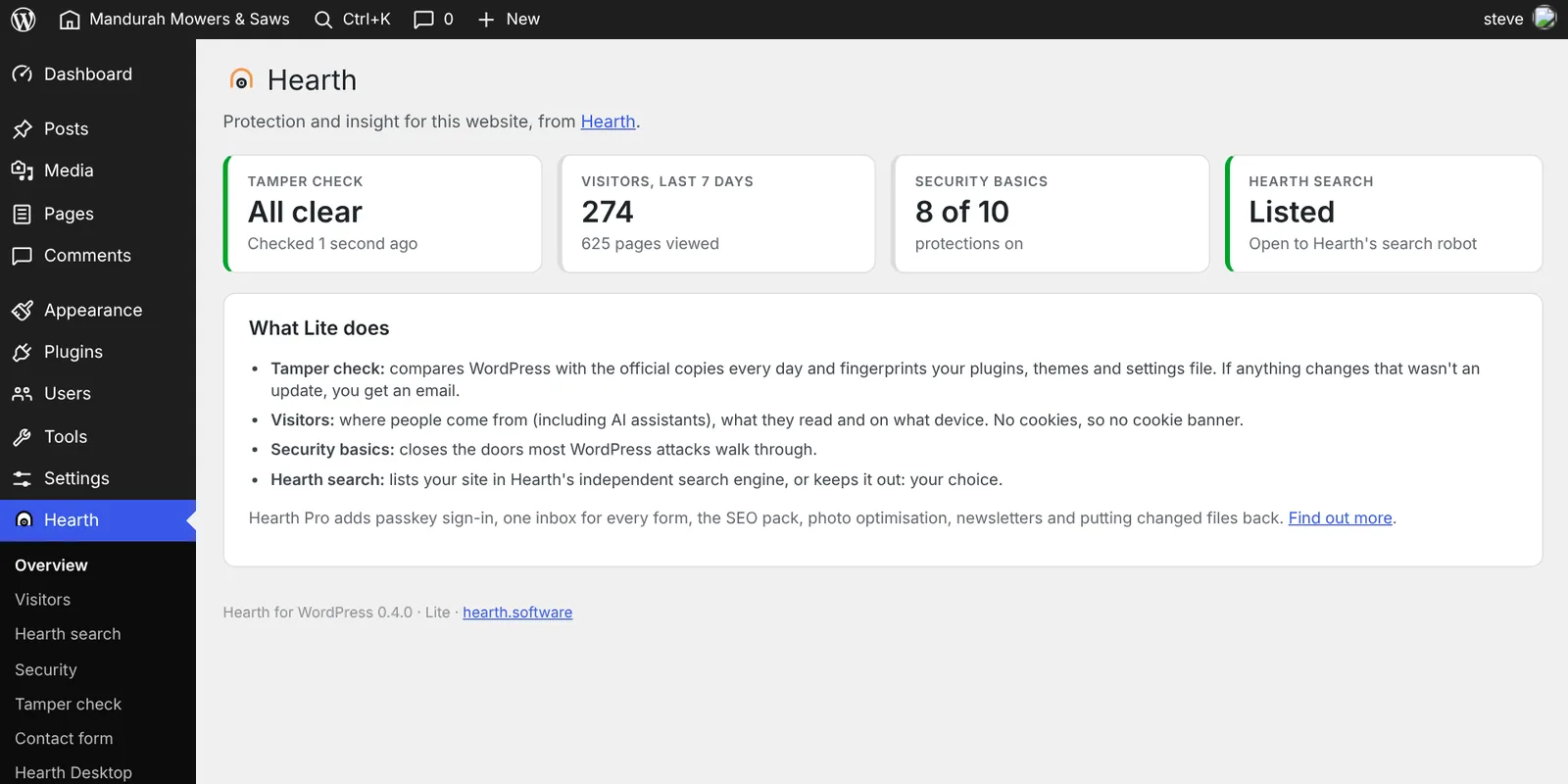
Everything at a glance
Open Hearth in the WordPress menu. Four cards tell you if anything has changed, how many people visited, how many protections are on, and whether you're in Hearth search. Click any card for the detail.
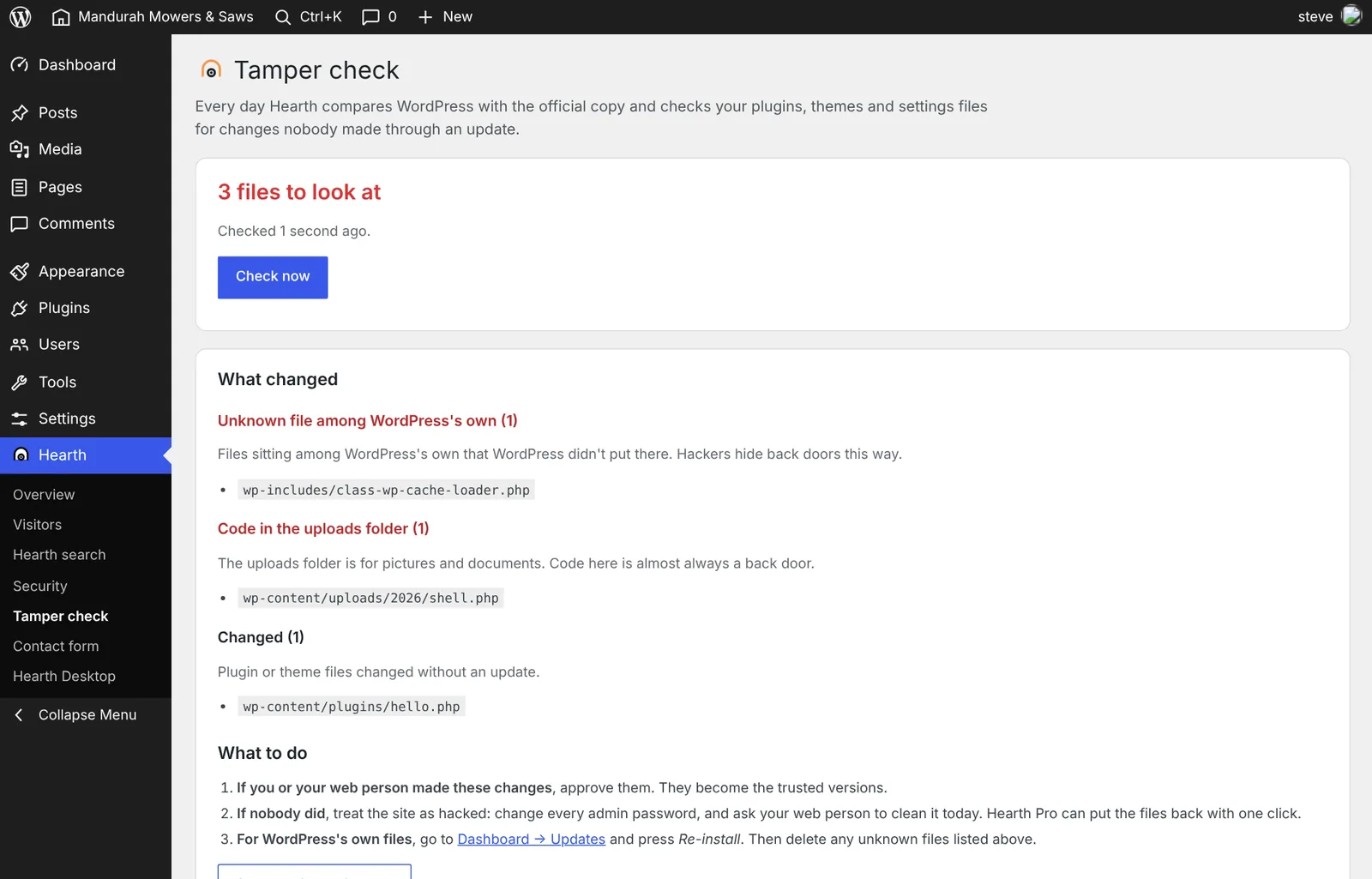
The day something changes, you know
Here the tamper check caught three planted back doors: an unknown file among WordPress's own, code in the uploads folder, and a changed plugin. Each one is explained in plain English, with exactly what to do next. You also get an email, and a red banner on every admin page until it's dealt with.
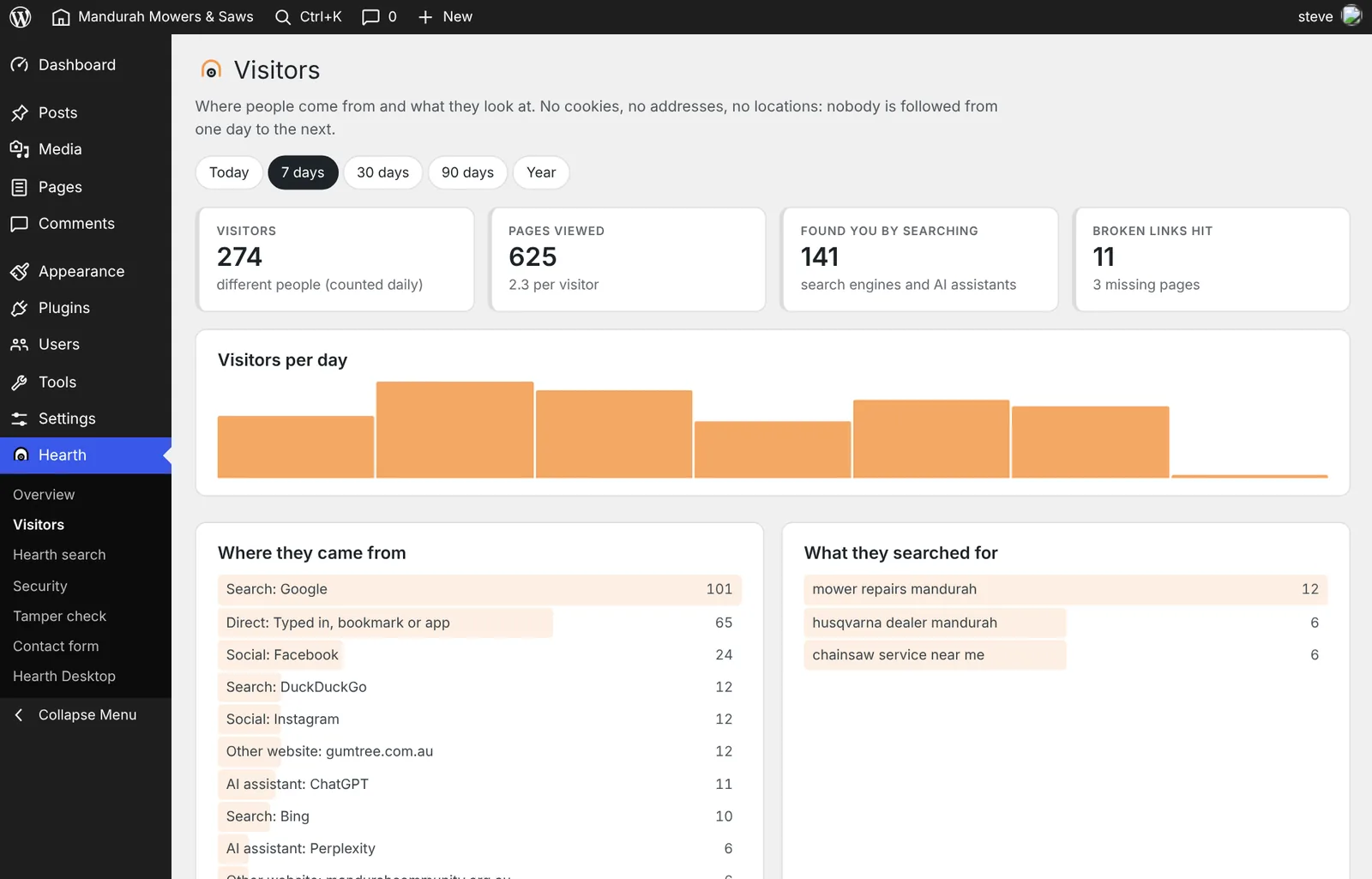
Where your customers come from
Google, Facebook, ChatGPT, a newsletter, or another website: you see where visitors came from, what some of them searched for, what they read and on what device. No cookies, so no cookie banner.
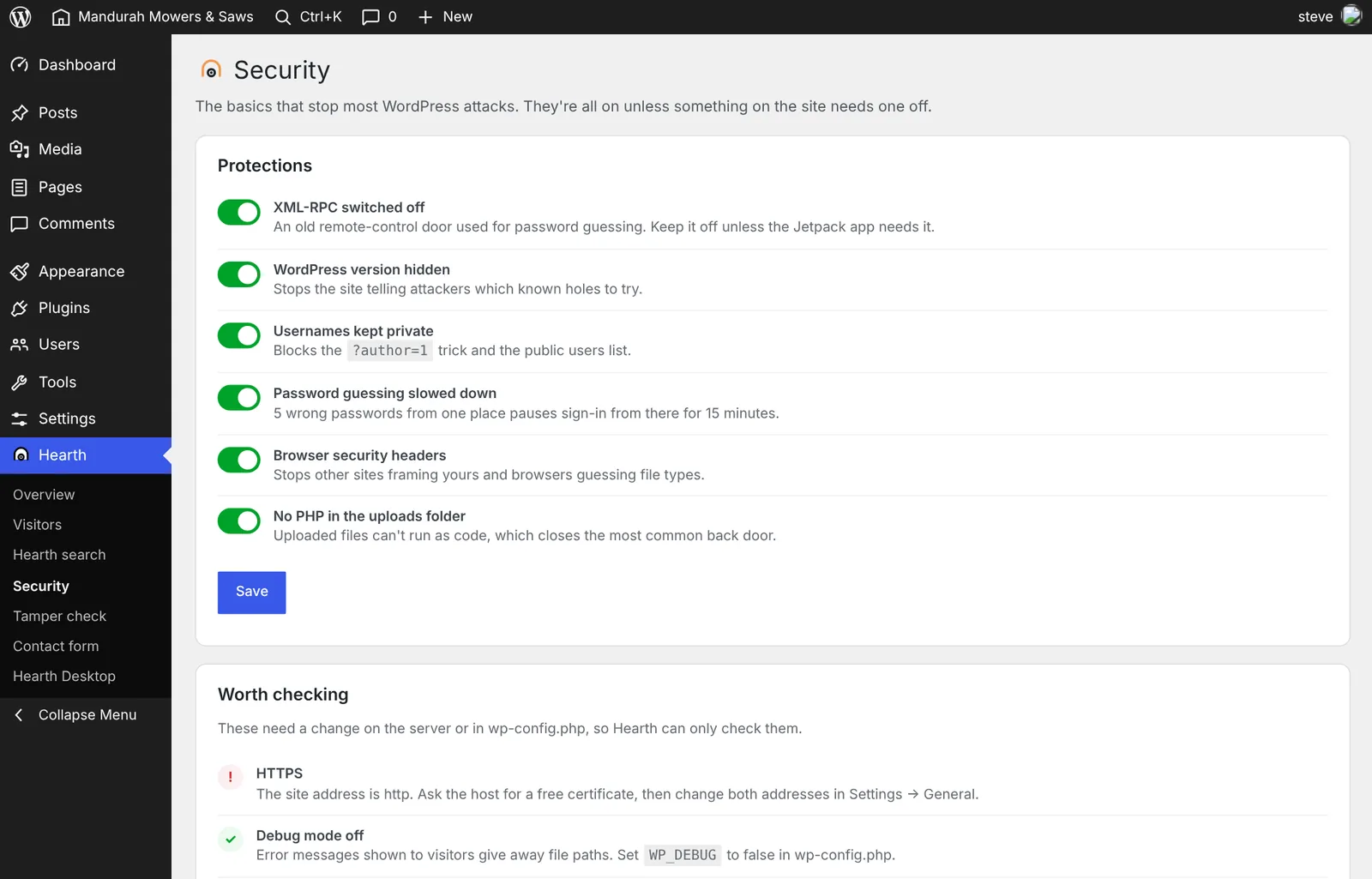
Closes the doors attackers use
Every protection is on from the start, each with its own switch and a sentence on what it does. Underneath, Hearth checks the things only you or your host can change, like HTTPS and debug mode.
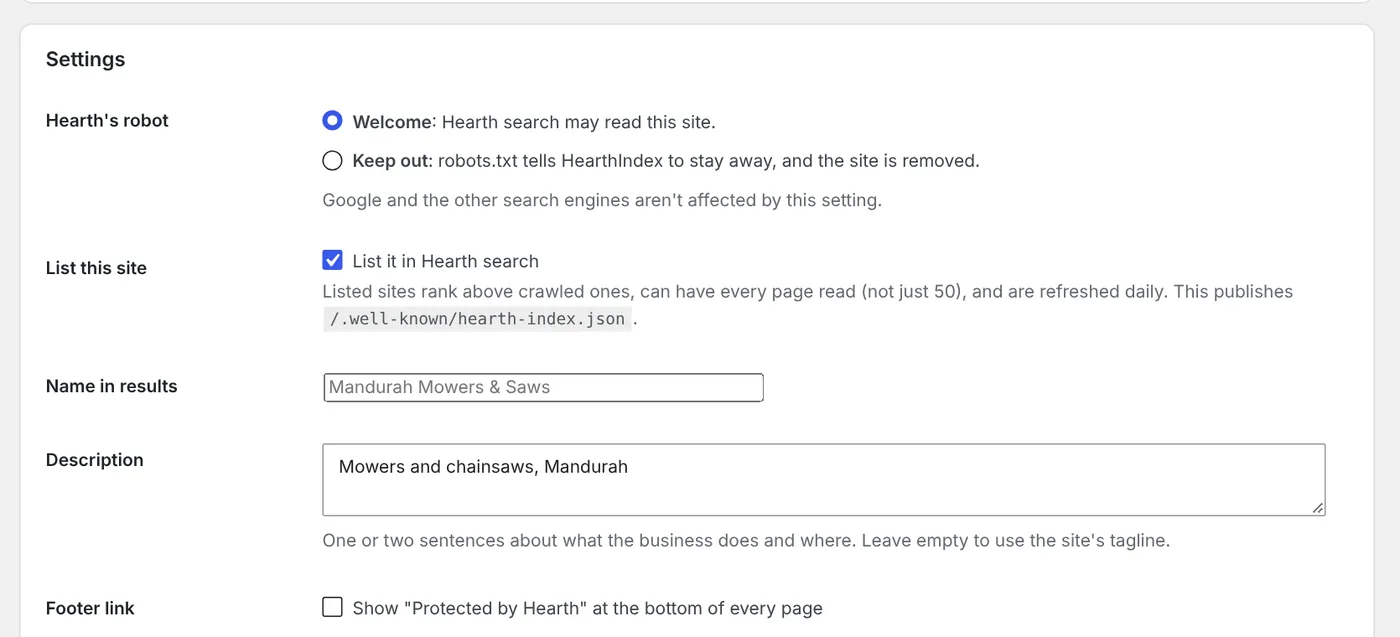
Your say in Hearth search
Welcome Hearth's robot or keep it out. List the site so it ranks higher and is read every day, and write the description people see in the results.
Start free. Grow when you're ready.
Three steps, at your pace. Nothing locks you in.
Protect it, and see who visits
- Daily tamper check with email alerts
- Security basics
- Cookieless visitor stats
- Hearth search listing and robot settings
- Contact forms into Hearth
Run the business from WordPress
- Sign in with your face or fingerprint (passkeys): no passwords to steal
- One inbox for every form, with replies from the admin
- SEO pack: business details for Google, photo names and descriptions
- Photos resized and cleaned of location data
- Newsletters
- One click to put changed files back
No WordPress at all
- We rebuild the site on Hearth CMS: faster and far harder to hack
- Your pages, photos and settings come across
- Old addresses redirect, so you keep your Google ranking
- Staff keep their sign-ins and enquiry history
Install it in two minutes
- Download the plugin (until it's in the WordPress plugin directory, ask us for it)
- In WordPress, go to Plugins → Add New → Upload Plugin and choose the zip file.
- Press Activate. Everything useful is on straight away; open Hearth in the menu to see it.
After you install: five minutes to set it up
Everything works straight away. These are the few things worth checking.
- Check the email addressAlerts go to the address in Settings → General → Administration Email Address. Make sure it's one you actually read.
- Run the first tamper checkGo to Hearth → Tamper check and press Check now. The first run records how your site looks today; from then on it checks every day by itself. If it lists anything on the first run, show your web person.
- Choose about Hearth searchIn Hearth → Hearth search, pick Welcome or Keep out. To be listed, tick List it in Hearth search, write one or two sentences about what you do and where, and press Save.
- Look over SecurityLeave every switch on unless something stops working. The one exception: if you use the Jetpack phone app to post, switch XML-RPC back on. Then read the Worth checking list and pass anything with a "!" to your web person or host.
- Add one line to your privacy policyFor example: "We count visits without cookies. We don't store IP addresses or track you between days." Then give Visitors a day or two to fill up.
Updating: download the new zip, go to Plugins → Add New → Upload Plugin, choose it, and press Replace current with uploaded. Your settings and visitor history are kept.
What we promise
Visitor counts live on your own server. Nothing is sent to us.
The plugin only talks to Hearth when you list your site in Hearth search.
One quiet line about Pro on the overview screen. That's it.
"Protected by Hearth" in your footer is off unless you turn it on.
Questions
Will it slow my site down?
No. The visitor counter is a few hundred bytes sent after the page has loaded. The tamper check runs once a day in the background.
Do I still need a cookie banner?
Not for Hearth's visitor stats: they use no cookies and keep no personal information. Other plugins you run (Google Analytics, Facebook pixel, chat widgets) may still need one. A line in your privacy policy is good manners: "We count visits without cookies. We don't store IP addresses or track you between days."
I already use Wordfence or another security plugin.
That's fine: Hearth works alongside it. If both limit sign-in attempts, you'll just be locked out a little sooner after wrong passwords.
What happens if the tamper check finds something?
You get one email and a red notice in your admin, listing exactly which files changed. If you or your web person made the change, press Approve. If nobody did, change your admin passwords and get the site cleaned that day. Pro will put the files back with one click.
My host uses nginx. Does it still work?
Yes. One protection, blocking code in the uploads folder, needs a rule only your host can add on nginx. The Security screen tells you exactly what to ask them for.
What is Hearth search, and do I have to be in it?
It's an independent search engine for the indie web: small businesses, makers, clubs and open projects, without government, big media or big tech crowding the results. You choose: list your site, let the robot find it, or keep it out. How the robot behaves.
I'm a web agency. Can I use it on client sites?
Yes, Lite is free on as many sites as you like. Hearth Desktop can also show the health of every site in one place. Get Hearth Desktop.
Stop finding out last.
Free, two minutes to install, and it starts watching straight away.